What happens during a professional CCTV site survey?
Find out what a CCTV survey checks, what to prepare before the visit and what to look for in the proposal that follows.
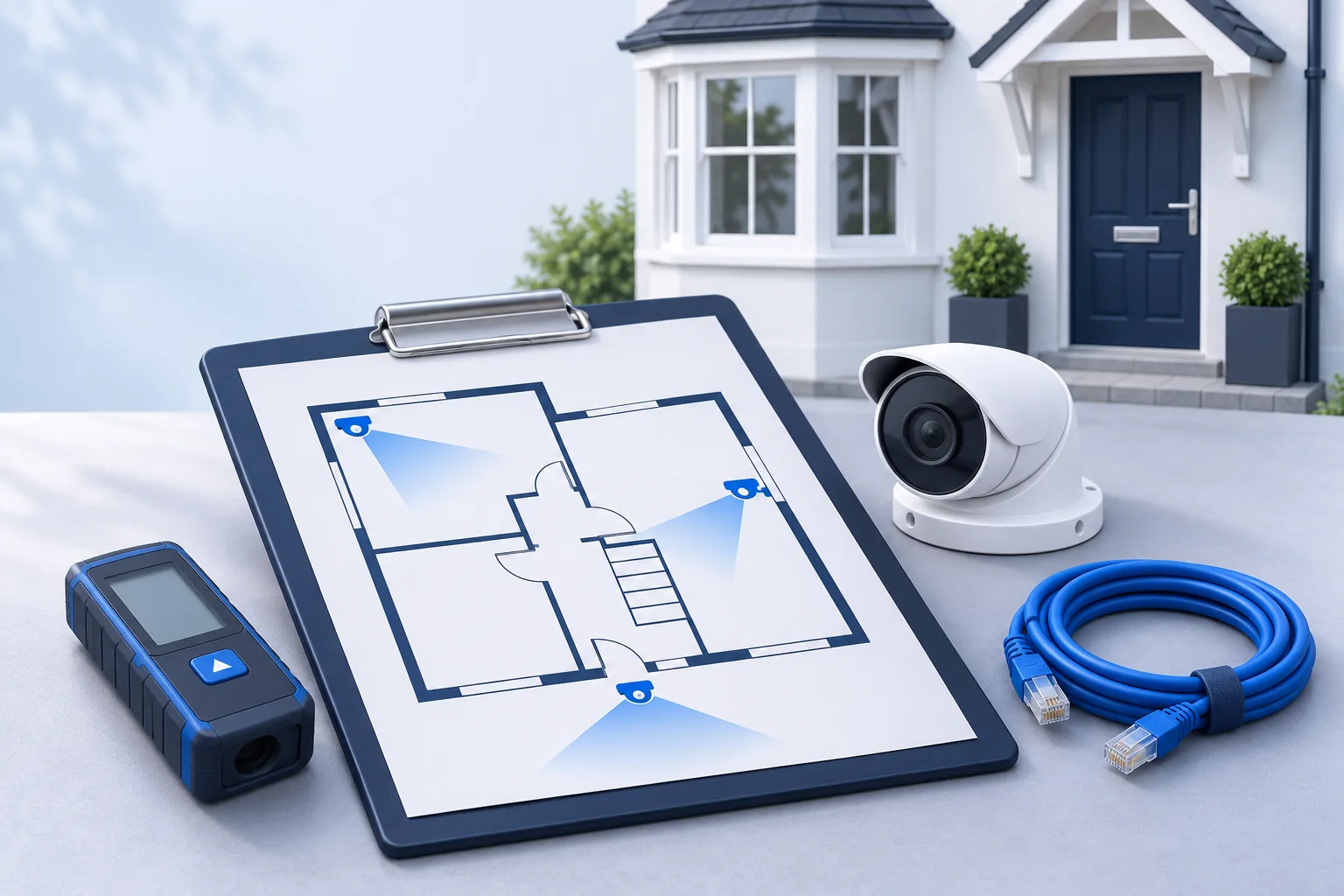
A CCTV site survey turns your security needs into a practical installation plan. It reviews what each camera must show, the site conditions, cable routes, power, recording and viewing requirements. The agreed survey scope determines which checks and documents are included; installation and final performance testing are separate stages.
What is the survey for?
A useful survey starts with the problem you want to address. Perhaps a side entrance is out of sight, deliveries need checking or an existing system does not provide useful recordings. Counting cameras comes after understanding that requirement.
The visit should help establish what is achievable, what needs further investigation and which choices affect the installation. It also gives you a chance to discuss appearance, budget, disruption and future changes before agreeing the work.
Understand the requirement
Discuss the property, the concern and what each view needs to show.
Walk the site
Review positions, light, routes, power, recording and practical access.
Agree the proposal
Clarify the recommended work, options, assumptions and next steps.
Confirm the scope before the appointment. A preliminary visual survey, a detailed system design and a diagnostic visit to an existing faulty system are different services. Ask which one is being arranged and whether any survey or design charge applies.
First: discuss what you need to see
Expect questions about the property, previous concerns, the areas that matter and who will operate the system. For a business, this can include opening hours, deliveries, staff access and the person who will manage recordings.
Turn broad requests into specific tasks: an overview of the driveway, a useful view of someone at the front entrance or coverage of movement through a side passage. Discuss the distance and the conditions in which the view must work. Seeing that someone is present is different from having enough detail to identify them.
Explain any needs beyond ordinary video, such as reading moving number plates or linking alerts to another system. These require their own assessment and should not be assumed from a camera’s resolution or feature list.
Walk the property and consider camera positions
The surveyor reviews possible mounting points and views, considering doors, gates, approach routes, walls, vegetation and other obstructions. The right position balances useful detail, coverage, appearance, access for maintenance and the risk of interference.
Camera count and lens choice follow the job each view must do. A wide view may cover more ground while providing less detail at one particular point. Read our home camera placement guide and camera specifications guide for those trade-offs.
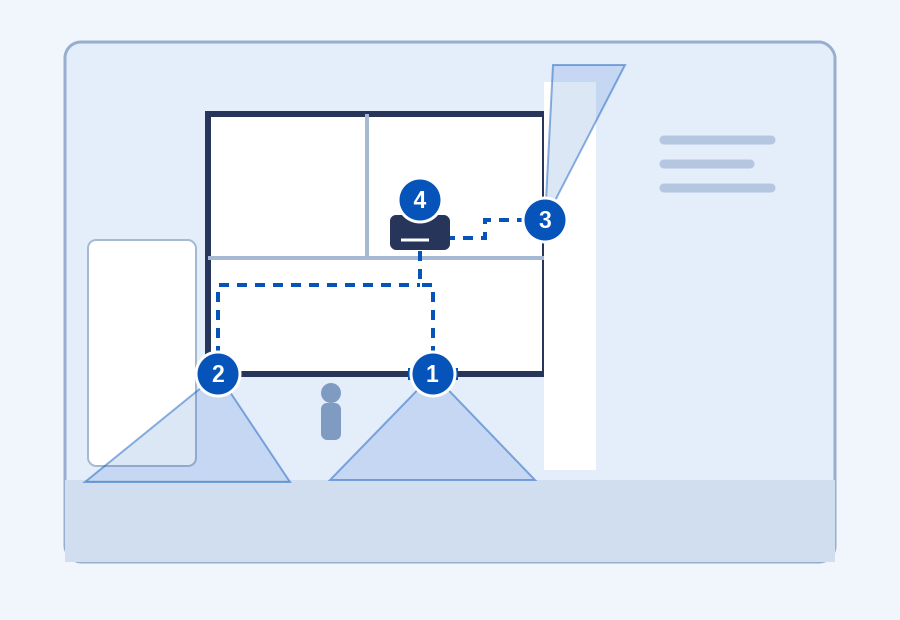
Illustrative layout only. Camera positions, coverage shapes and cable routes are schematic, not a design for a particular property.
Front entrance
Discuss the detail needed when a visitor reaches the doorway.
Driveway overview
Review the vehicle approach, obstructions and light direction.
Side access
Check the passage, gate, mounting options and cable protection.
Recorder & network
Consider a suitable equipment location, connections and service access.
Check lighting and the effect on other people
Light changes across the day. Bright backgrounds, headlights, shaded doorways and nearby surfaces can affect the intended view. A daytime visit can identify likely issues, but it does not prove night-time performance. Agree whether further assessment or an after-dark commissioning check is needed.
Ask how any supplementary lighting would work and where it would shine. The Axis lighting guide also highlights purpose, light and power as site-survey considerations.
Privacy belongs in the planning discussion. Identify neighbouring windows, gardens, public paths and shared entrances that might enter the view. Consider adjusting the framing and using suitable privacy masks rather than recording more than the purpose requires.
For home systems that capture beyond the property boundary, the ICO explains the applicable data-protection responsibilities. For businesses and managed properties, review the ICO’s organisational guidance, including purpose, signs, access and retention. Audio recording needs a separate justified purpose; it should not be enabled simply because a camera has a microphone.
Review cable routes, power and the network
A camera position is only useful if it can be connected and maintained properly. The survey considers likely cable paths, distances, access, protection, containment and the appearance of visible runs. It should flag where concealed routes or inaccessible spaces still need confirmation.
Discuss proposed holes, making good and permissions before work starts. A visual survey does not establish everything hidden behind a wall or ceiling. Access equipment, restricted areas and work around occupied premises can also affect the installation plan.
The equipment location needs consideration too: power, ventilation, physical protection, network connections and access for servicing. If backup power is required, identify which parts of the system need to remain operational rather than assuming the recorder alone is enough.
For remote viewing, discuss the internet connection, router location and any involvement needed from your IT provider. Do not send Wi-Fi passwords or administrator credentials in an initial enquiry. See our cabling and connection-protection guide for more background.
Agree recording, viewing and existing-equipment checks
Discuss how recordings will be used: continuous or event-based recording, operating schedules, playback, exporting an incident and who needs access. Retention should reflect the purpose of recording, with storage sized around the chosen quality and schedule. A larger hard drive alone does not settle the requirement.
Our CCTV storage calculator can help compare planning estimates. The actual recording settings and achieved retention still need checking on the installed system.
If equipment is already present, provide its model details and any records you have. Reuse depends on condition, access, compatibility and whether it meets the new requirement. Seeing a live picture does not prove that old cables, disks or remote access are healthy; testing or fault-finding may need a separately agreed scope.
Make clear whether you want monitoring, notifications or integration with alarms, door entry or access control. Agree who responds to alerts and what is included. These functions are not automatic consequences of fitting cameras.
What should you prepare before the visit?
- Your priorities: the areas of concern and what you would like to see there.
- Access arrangements: gates, relevant rooms and any restrictions or site induction requirements.
- Authority and permissions: involve the owner, managing agent or other decision-maker where needed.
- Existing information: available plans, equipment models, previous installation records and known faults.
- Operating requirements: viewing users, recording needs, opening hours and alert expectations.
- Practical preferences: equipment appearance, cable visibility, budget priorities and planned building work.
Photos can help prepare for the appointment, but avoid including passwords, private documents or unnecessary images of other people. You do not need to climb, open equipment or move heavy objects to collect information for us.
What should the proposal make clear?
Ask for a proposal proportionate to the job. A straightforward home installation and a multi-building business system may need different levels of documentation. Confirm whether a marked-up plan or detailed drawings are included.
Check these points before agreeing the work
- The intended views, equipment and recording approach.
- The installation work, cable routes or route assumptions, and equipment locations.
- Remote viewing, accounts, licences or subscriptions, where applicable.
- Permissions, access requirements, exclusions and anything still to be investigated.
- The quotation, optional work and the process for agreeing changes.
- Commissioning, user training, documentation, warranty and aftercare.
Installation prices are quotation-only. If an inaccessible route, unsuitable existing cable or other unresolved condition affects the proposal, understand the assumption and how additional work would be approved. Do not treat an initial estimate as confirmation of an unverified route.
For a larger project, our security system design service can develop the requirement and documentation in more detail.
The survey is the plan; commissioning checks the result
The survey identifies the intended outcome and practical constraints. Once installed, the system needs to be configured and tested against that outcome. This should include the relevant views, saved recordings, playback and export, authorised viewing access and the agreed lighting conditions.
Ask how to use the system and who to contact afterwards. A design diagram or a good live daytime picture is not a substitute for checking that useful footage is actually being recorded.
How long the survey takes depends on the property, access and scope. Photos may support an initial discussion, while complex routes or existing faults can need further inspection. WESEC will discuss the appropriate next step for your property before arranging the work. Explore our CCTV installation process or request a call back.
Discuss your own property. WESEC is based in Aylesbury and covers surrounding areas, including Milton Keynes and Tring, subject to postcode confirmation. Check our service areas.